
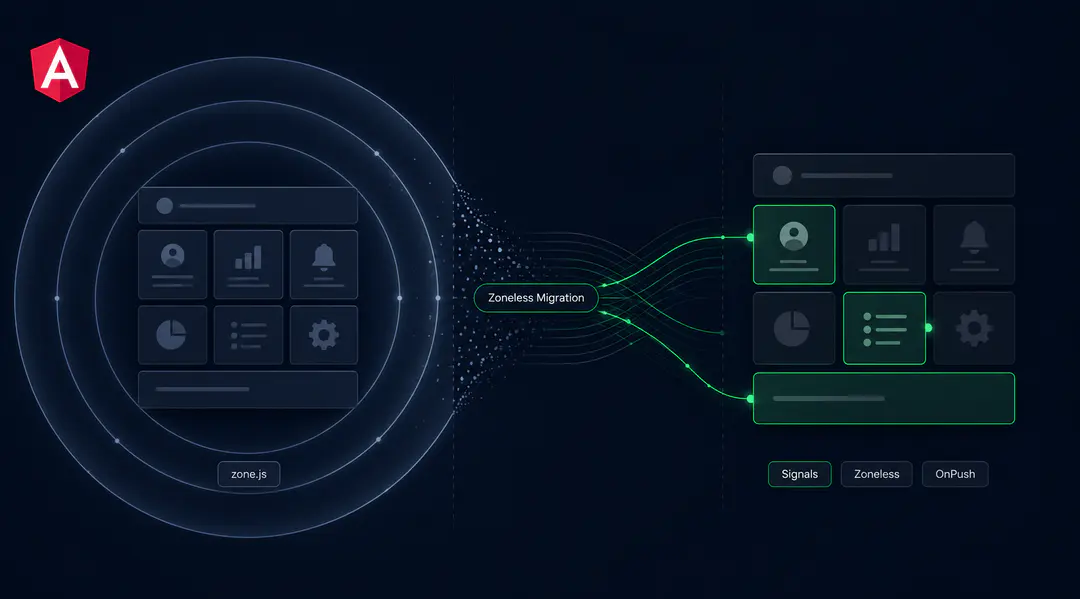
Zone.js has been Angular's invisible engine for a decade. It monkey-patches every async browser API (setTimeout, Promise, fetch, addEventListener) and tells Angular to run change detection after each one. This works, but it works too often. A mouse move triggers change detection. A setTimeout that has nothing to do with the UI triggers change detection. A WebSocket message that updates a single data point triggers a full component tree check.
Angular 21 makes zoneless change detection the default for new projects. Signals replace zone.js's blanket approach with precise, opt-in reactivity: a component re-renders only when a signal it reads has actually changed. The result is roughly 33KB less JavaScript in the bundle and 30 to 40% less rendering overhead in production. Gmail, Google Cloud Console, and Microsoft Office web apps all run Angular in production at massive scale.
For existing Angular applications, this is the most significant migration since the move from AngularJS to Angular 2. Among angular 21 new features, zoneless is the most architecturally consequential, but unlike the AngularJS rewrite, this one can happen incrementally.
What Zoneless Change Detection Actually Changes
Zoneless Angular fundamentally changes how Angular knows when to update the DOM. The angular change detection strategy shifts from "check everything after every async event" to "check only what changed." Understanding this shift is the foundation for every migration decision.
With zone.js (the old model):
- An async event fires (HTTP response, timer, user click)
- Zone.js intercepts it and notifies Angular
- Angular runs change detection from the root component down the entire tree
- Every component's template bindings are checked, even if nothing changed
- Components using OnPush are skipped unless their inputs changed or an event occurred within them
With signals (the zoneless model):
- A signal value changes via
.set(),.update(), or.mutate() - Angular marks only the components that read that signal as dirty
- On the next change detection cycle, only those components are checked
- No root-to-leaf tree walk, no checking components that did not change
The performance difference is most visible in large applications. A dashboard with 200 components where a single data point updates: zone.js checks all 200 components. Signals check the 3 that actually display that data point. At scale, this is the difference between a smooth 60fps experience and visible jank during data-heavy operations.
provideZonelessChangeDetection() graduated to stable in Angular 20.2. Angular 21 removed it from the boilerplate entirely: new projects are zoneless by default. Existing projects can adopt it incrementally by enabling the provider and converting state to signals one component at a time.
Angular Signals: The Building Blocks
Angular signals were introduced as a developer preview in Angular 16 and graduated to stable in Angular 17. They are not conceptually complex, but they replace patterns that most Angular developers have used for years. Here is how each primitive works.
signal() creates a writable reactive value:
const count = signal(0);
console.log(count()); // 0
count.set(5);
count.update(v => v + 1); // 6
computed() creates a derived value that recalculates only when its dependencies change:
const price = signal(100);
const tax = signal(0.2);
const total = computed(() => price() * (1 + tax()));
// total() recalculates only when price or tax changes
effect() runs side effects when signals change. Use this for logging, analytics, or syncing with external systems. Do not use it for setting other signals (use computed or linkedSignal instead):
effect(() => {
  console.log(`Count changed to ${count()}`);
});
linkedSignal() (stable since Angular 20) creates a writable signal that resets when a source signal changes. Useful for form fields that should reset when a parent selection changes:
const selectedCategory = signal('electronics');
const selectedProduct = linkedSignal(() => {
  selectedCategory(); // dependency
  return null; // reset to null when category changes
});
toSignal() and toObservable() bridge signals and RxJS. toSignal() converts an Observable to a signal. toObservable() converts a signal to an Observable. These are critical for incremental migration because they let signals and Observables coexist in the same component.
input() and output() replace the @Input() and @Output() decorators with signal-based equivalents. input() returns a read-only signal. Angular provides automated schematics to convert these.
Angular Zoneless Migration: What to Do and in What Order
Migrating a large Angular application to zoneless is not a weekend project. It is a multi-sprint effort that can happen alongside feature work if you sequence it correctly.

Phase 1: Enable OnPush Everywhere
Before touching signals, ensure all components use ChangeDetectionStrategy.OnPush. OnPush is the halfway house between zone.js default detection and zoneless: it already limits when Angular checks a component. If your application works correctly with OnPush everywhere, the signals migration will surface far fewer surprises.
Angular provides a migration schematic:
ng generate @angular/core:onpush-migrationThis converts components to OnPush and adds ChangeDetectorRef.markForCheck() calls where the schematic detects state mutations that would not trigger OnPush detection. Review these: each markForCheck() call is a candidate for signal conversion later.
Phase 2: Convert Inputs and Outputs
Run the automated migration schematics:
ng generate @angular/core:signal-input-migration
ng generate @angular/core:signal-output-migration
ng generate @angular/core:signal-queries-migration
These convert @Input() to input(), @Output() to output(), and @ViewChild() / @ContentChild() to signal-based queries. The schematics handle template references, host bindings, and most common patterns automatically. They skip inputs that are not safe to convert (inputs that are written to, for example) and log warnings.
This is the highest-volume change in the migration. A 200-component application might have 600 inputs. The schematic converts most of them. Manual review is needed for edge cases: inputs with setters, inputs used in lifecycle hooks before ngOnInit, and inputs aliased with different names.
Phase 3: Convert Component State to Signals
This is the step that requires the most judgment. Replace class properties with signal(), derived state with computed(), and Observable subscriptions with toSignal() where appropriate.
Before (zone.js pattern):
@Component({
  template: `<p>{{ fullName }}</p>`
})
export class UserComponent {
  firstName = '';
  lastName = '';
  get fullName() { return `${this.firstName} ${this.lastName}`; }

  async loadUser(id: string) {
    const user = await this.http.get(`/api/users/${id}`);
    this.firstName = user.firstName;
    this.lastName = user.lastName;
  }
}
After (signals pattern):
@Component({
  template: `<p>{{ fullName() }}</p>`
})
export class UserComponent {
  firstName = signal('');
  lastName = signal('');
  fullName = computed(() => `${this.firstName()} ${this.lastName()}`);

  async loadUser(id: string) {
    const user = await this.http.get(`/api/users/${id}`);
    this.firstName.set(user.firstName);
    this.lastName.set(user.lastName);
  }
}
The key change: in the template, fullName becomes fullName(). Every signal is a function call. In zoneless mode, this function call is how Angular tracks which components depend on which data.
Do not convert everything at once. Start with leaf components (components with no children), verify they work, then move up the tree. Components that already use OnPush correctly will require the least refactoring.
Phase 4: Enable Zoneless
Once your components use signals for state and OnPush for change detection, enable zoneless:
// app.config.ts
import { provideZonelessChangeDetection } from '@angular/core';

export const appConfig = {
  providers: [
    provideZonelessChangeDetection(),
  ]
};
Remove zone.js from your polyfills in angular.json. Your bundle immediately drops by the size of zone.js.
Run the application. Components that still mutate state without signals will not trigger re-renders. This is the moment where zone-dependent patterns surface.
What Breaks in Angular When You Remove Zone.js
These are the patterns that fail in zoneless Angular. Each one worked because zone.js was silently triggering change detection after async operations.
| Pattern | What Happens | Fix |
|---|---|---|
Direct property mutation (this.title = 'new' in a callback) | No re-render. Angular does not know the property changed without zone.js intercepting the async callback. | Convert the property to a signal() |
setTimeout / setInterval for UI updates | setTimeout(() => this.showMessage = true, 3000) no longer triggers change detection. | Use a signal. Avoid markForCheck() as it defeats the purpose of going zoneless. |
| RxJS subscriptions assigning to plain properties | this.data$.subscribe(d => this.items = d) mutates a plain property. No re-render. | Use toSignal(this.data$) instead, which creates a signal that updates when the Observable emits. |
Two more patterns need specific attention because the fixes are less straightforward:
Third-party libraries that mutate Angular state outside signals. Chart libraries, map libraries, and drag-and-drop libraries that modify component properties in their own callbacks will not trigger re-renders. Wrap the library callback in a signal update, or use afterRenderEffect() to sync external state with the component's signal graph.
fakeAsync and tick() in tests. Zone.js powers fakeAsync zones in unit tests. Without zone.js, fakeAsync, tick(), and flush() throw errors. The Angular team provides provideZonelessTesting() utilities, but existing tests that rely on fakeAsync need rewriting. This is often the most time-consuming part of the migration for large test suites. Replace fakeAsync with async/await patterns and use fixture.whenStable() or TestBed.flushEffects().
Angular Signals vs RxJS: Coexistence, Not Replacement
The angular signals vs observables question comes up in every migration discussion. The short answer: signals replace the simple, synchronous state that most components manage (a boolean flag, a string, a list of items). RxJS remains the right tool for complex async flows: debounced search, retry logic, combining multiple streams, race conditions, and cancellation.
The interop functions make this practical:
toSignal() converts an Observable to a signal for template binding:
const users = toSignal(this.http.get<User[]>('/api/users'), {
  initialValue: []
});
// In template: {{ users().length }} users loaded
toObservable() converts a signal to an Observable for when you need RxJS operators:
const searchTerm = signal('');
const searchResults$ = toObservable(this.searchTerm).pipe(
  debounceTime(300),
  switchMap(term => this.api.search(term))
);
const results = toSignal(searchResults$, { initialValue: [] });
The pattern: signals for state, RxJS for async orchestration, toSignal/toObservable at the boundaries. Do not force RxJS into signals for complex flows, and do not keep using RxJS for simple state that a signal() handles more cleanly.
resource() (available since Angular 19) handles the common pattern of loading async data based on signal parameters:
const userId = input.required<string>();
const user = resource({
  request: () => this.userId(),
  loader: ({ request: id }) => this.http.get<User>(`/api/users/${id}`)
});
// user.value() is the loaded data
// user.isLoading() for loading state
// user.error() for error state
This replaces the verbose pattern of subscribing to route params, switching to an HTTP call, managing loading/error states, and unsubscribing on destroy. For most data-fetching components, resource() is the cleaner solution.
Angular Performance After Going Zoneless
For angular performance optimization, the gains from going zoneless are real but context-dependent. Here is what changes and where it matters most:
| Metric | Impact | Where It Matters Most |
|---|---|---|
| Bundle size | ~33KB (gzipped) removed | Mobile users on 4G (~200ms faster load) |
| Rendering efficiency | 30–40% less rendering overhead | Large apps (100+ components) with localized updates |
| Memory | Lower async tracking overhead | Apps with many WebSocket connections, polling intervals, animation frames |
The sweet spot for these gains is applications with frequent, localized updates: dashboards, admin panels, data tables with live filtering. A 200-component dashboard where a single data point changes will skip checking the 190 components that did not change. Applications where most components update simultaneously (real-time collaboration tools) will see less improvement.
Do not migrate purely for performance. If your application's Core Web Vitals are already good, the migration effort may not justify the runtime gains. Migrate when you need the improvement, when you want to adopt modern Angular patterns, or when your frontend development team is starting a new project and wants to build on the current default.
Testing Angular Components After Zoneless
The testing story is the part of the migration that teams underestimate most.
Unit tests with TestBed continue to work. Signal-based components render correctly in TestBed. The main difference: instead of setting input properties directly, you use componentRef.setInput() or create wrapper components with signal inputs.
fakeAsync and tick() break. These utilities depend on zone.js to control async timing. Without zone.js, they throw errors. The replacement patterns:
- Use
async/awaitwithfixture.whenStable() - Use
TestBed.flushEffects()to process pending signal effects - For timer-based tests, use real
setTimeoutwithwaitForAsyncor Jasmine's clock mocking
Component tests need signal awareness. Testing a component that uses input() signals requires setting inputs via the component's input API, not by assigning properties:
// Before (zone.js + @Input)
component.userId = '123';
fixture.detectChanges();

// After (signals + input())
fixture.componentRef.setInput('userId', '123');
fixture.detectChanges();
Integration and E2E tests are unaffected. Protractor is gone (replaced by Cypress, Playwright, or WebDriverIO), and none of these depend on zone.js. They interact with the rendered DOM, which works identically regardless of the change detection strategy.
The practical advice: migrate tests alongside component migration. When you convert a component to signals in Phase 3, update its tests in the same PR. Do not defer test migration to a separate phase: it creates a growing pile of broken tests that slows down the entire team.
Common Angular Zoneless Migration Mistakes
Using effect() for derived state. This is the most common conceptual mistake. If you find yourself writing effect(() => { this.total.set(this.price() * this.quantity()); }), use computed() instead. effect() is for side effects (logging, analytics, external sync), not for computing values. computed() is lazy, cached, and does not create unnecessary signal writes.
Attempting a big-bang conversion. A 500-component application does not need every component converted before shipping. Convert leaf components first, work up the tree, and keep zone.js enabled until most components are signal-based. Both models coexist.
Skipping the automated schematics. Angular provides migration schematics for inputs, outputs, and queries. Running them first handles the mechanical bulk and lets you focus manual effort on patterns that require judgment.
Leaving zone.js in polyfills after enabling zoneless. Enabling provideZonelessChangeDetection() but leaving zone.js in angular.json polyfills means zone.js still loads, patches browser APIs, and adds to the bundle. Remove it explicitly.
Replacing all RxJS with signals. Signals handle synchronous state well. Debouncing, retry logic, stream combination, and cancellation still belong in RxJS. The interop functions (toSignal, toObservable) exist so you can use both where each is strongest.
Wrapping Up
The move from zone.js to signals is Angular's biggest architectural shift since standalone components. It is also the most rewarding: smaller bundles, faster rendering, and a reactivity model that is easier to reason about than zone.js's "check everything" approach.
The migration is not trivial for large codebases, but it is designed to be incremental. OnPush first, signal inputs second, component state third, zoneless last. Each phase delivers value on its own, and you can ship to production after each one.
Procedure's engineering team has shipped zoneless migrations for Angular applications with 200+ components across enterprise dashboards and admin panels.
If your team is evaluating whether the migration is worth the effort, or needs a second opinion on sequencing, talk to our frontend engineering team.
Frequently Asked Questions
What is zoneless change detection in Angular?
Zoneless change detection removes zone.js from Angular applications. Instead of zone.js intercepting every async operation and triggering a full component tree check, Angular uses signals to track exactly which components need updating. Only components that read a changed signal are re-rendered.
Do I have to migrate to zoneless right now?
No. Angular 21 makes zoneless the default for new projects, but existing applications continue to work with zone.js. The Angular team has not announced a deprecation timeline for zone.js support. However, all new Angular features are being designed around signals, so migrating positions your codebase for long-term maintainability.
Will signals replace RxJS?
No. Signals handle synchronous, component-level state. RxJS handles complex async flows (debouncing, retry, stream combination, cancellation). Angular provides toSignal() and toObservable() for interop. See the "Angular Signals vs RxJS" section above for detailed guidance on which to use where.
How much performance improvement will I see?
Removing zone.js drops ~33KB from the bundle. Rendering overhead decreases 30 to 40% in large applications (100+ components) with frequent, localized updates. The "Angular Performance After Going Zoneless" section above breaks down where gains are largest and where they are negligible.
What does Angular's migration schematic handle automatically?
The schematics convert @Input() to input(), @Output() to output(), and @ViewChild() / @ContentChild() to signal-based queries. They update template references and host bindings. They skip inputs with setters or other patterns that are not safe to auto-convert, and log warnings for manual review.
What breaks when I remove zone.js?
Direct property mutations in async callbacks, setTimeout/setInterval UI updates, third-party library state mutations, and RxJS subscriptions assigning to plain properties all stop triggering re-renders. fakeAsync and tick() in tests throw errors. See the "What Breaks" section above for a full breakdown with fixes.
Can I migrate incrementally?
Yes, and you should. The recommended path: enable OnPush on all components, convert inputs and outputs with schematics, convert component state to signals one component at a time, then enable zoneless once most components are signal-based. Zone.js and signals coexist during migration.
What is linkedSignal and when should I use it?
linkedSignal creates a writable signal that resets to a default value when a source signal changes. Use it for dependent state: a product selection that resets when the category changes, a form field that clears when the parent selection updates. It replaces the pattern of watching inputs in ngOnChanges and resetting state manually.
Procedure Team
Engineering Team
Expert engineers building production AI systems.