
Ask five developers to review a pull request, and you'll get five different checklists. One checks for hardcoded secrets. Another skips it. A third remembers to look for PHI in log statements but forgets to check migration safety. By the fifth review of the day, everyone's abbreviating.
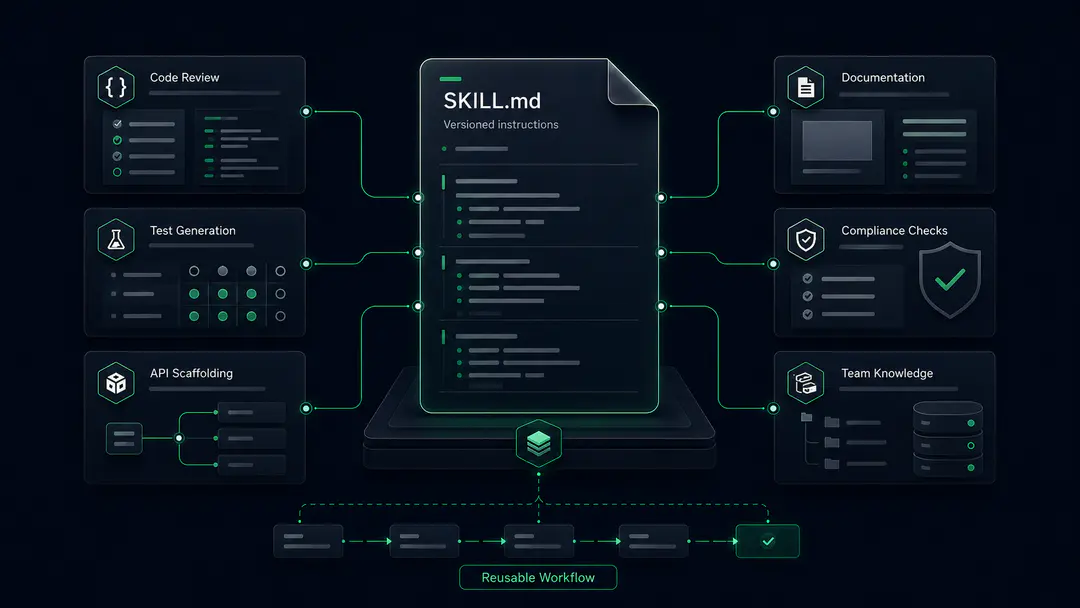
This is the problem AI agent skills solve. Instead of retyping review instructions into every conversation, hoping you remember the full checklist, you write the instructions once as a SKILL.md file in your repo. The AI agent loads that file and follows it identically every time, regardless of who invokes it or what time it is.
I've built 17 skills and 3 agents for a Django REST Framework healthcare backend (Python 3.11, Django 4.2) over the past six months. The codebase handles patient records, clinical notes, and real-time medical transcription. Some run daily. Four turned out to be a waste of time, and a few taught me hard lessons about token cost, prompt injection, and skills that silently drift from the codebase.
This is the guide I wish I had when I started.
What Is an AI Agent Skill and How Does It Work?
An AI agent skill is a Markdown file in your repository that contains YAML frontmatter and structured instructions, giving an agent the ability to perform a specific task the same way every time it's invoked. The format was introduced by Anthropic and later released as an open standard. It's now supported across tools, including Claude Code, Cursor, GitHub Copilot, Codex, and Gemini CLI.
Because SKILL.md follows an open standard, the file format itself is portable: a skill file written once is readable by Claude Code, Cursor, GitHub Copilot, Codex, and Gemini CLI. The frontmatter and progressive disclosure pattern are the same. Directory conventions vary by runtime, and the ecosystem is converging on .github/skills/ as the cross-tool default.
As of early 2026, GitHub Copilot looks for project skills in .github/skills/<skill-name>/SKILL.md and personal skills in ~/.copilot/skills/, with additional locations configurable via chat.agentSkillsLocations in settings.json.
Cursor auto-detects skills from its own location and also reads from Claude Code's .claude/skills/ directory, so a skill installed once for Claude Code will work in Cursor without copying.
The .claude/skills/ path is increasingly described as the legacy location for cross-tool work, with newer installs landing in .github/skills/ by default. If you're targeting more than one runtime, the safest approach is to commit skills to .github/skills/ and let each tool's path config pick them up.
The frontmatter defines when the skill should load, what tools it can access, and what input format to expect. The body contains a step-by-step workflow that the agent follows.
Here's what the frontmatter looks like for a code review skill built for a healthcare API codebase:
---
name: code-review

description: Review code for quality, consistency, security, and codebase patterns.

allowed-tools: Read, Grep, Glob, Bash

argument-hint: [file_path or "git diff"]

---
The description field is more than documentation. It acts as routing logic - agent runtimes that support auto-discovery match conversation context against skill descriptions and load the skill automatically when it's relevant. Only name and description are required by the open spec; everything else is optional, and support varies by runtime. argument-hint is widely recognised and tells callers what format to pass. allowed-tools is marked experimental in the spec and implemented inconsistently across tools, so don't treat it as a security boundary - enforce real tool restrictions at the runtime level (your agent's permissions config or SDK options) and use the frontmatter for discovery and documentation rather than enforcement.
The result: every developer on the team gets the same review checklist, in the same order, covering the same checks. No drift, no abbreviation, no forgotten steps.
How AI Agent Skills Compare to Prompts and Agents
Understanding where skills sit relative to prompts and agents clarifies when each one is the right tool.
A prompt is a one-time instruction inside a conversation. It works for the session, then disappears. Good for quick questions. Poor for work that needs consistent, repeatable output.
A skill is one job, one file, used consistently across sessions and team members. If you've worked with Model Context Protocol (MCP) servers, think of skills as complementary: MCP provides tool access, skills provide the procedural knowledge for using those tools well.
An agent sits above both: it chains skills together for multi-step workflows. Tell an agent "scaffold a full CRUD endpoint for ClinicalNoteAudio" and it invokes /scaffold-api, then /generate-tests, then /auto-document in sequence.
| Prompts | Skills | Agents | |
| Scope | One conversation | One job, reusable | Multi-step workflows |
| Persistence | None | Git-versioned | Chains skills |
| Consistency | Varies each time | Identical every run | Depends on the skills used |
| Token cost | Repeats per request | Loads once per session | Depends on skill count |
| Team sharing | Copy-paste | Git repo | Built on shared skills |
The practical difference comes down to three things.
Consistency. An inline checklist of 300-500 tokens changes every time you type it. You shorten it under deadline pressure. You forget specific checks. A SKILL.md file runs the same instructions every time.
Versioning. Prompts have no history. Skills live in Git. When someone adds a security check, every future invocation includes it. When someone leaves the team, the knowledge stays in the repo.
Token cost. A prompt repeats with every request. A skill loads once per session through progressive disclosure, where the agent reads only the frontmatter at startup and loads the full instructions on demand. The savings compound across multiple files in a single session, but the math gets more complex with heavier skills.
The trap is building a skill for something you'll only do twice. If the task doesn't need repeatable consistency, a prompt is simpler and faster.
Inside a SKILL.md File: Structure That Scales
A well-structured AI agent skill has three components: the SKILL.md file itself (frontmatter plus workflow instructions), a references/ directory for deep reference material loaded on demand, and an examples/ directory with complete sample outputs.
your-skill/
├── SKILL.md          # Frontmatter + workflow instructions
├── references/       # Deep reference material loaded on demand
│   └── detail.md
└── examples/
    └── sample-output.md
To make this concrete: the hipaa-guardian skill scans codebases for protected health information across all 18 HIPAA Safe Harbor identifiers. Its SKILL.md is 253 lines with six reference files, structured as a multi-step workflow:
### Step 2: PHI detection
For each file, scan for the 18 HIPAA Safe Harbor identifiers:
1. Names, 2. Geographic data, 3. Dates, 4. Phone numbers,
5. Fax numbers, 6. Email addresses, 7. SSNs, 8. MRNs...

### Step 5: Risk scoring
Risk Score = (Sensitivity x 0.35) + (Exposure x 0.25) +
             (Volume x 0.20) + (Identifiability x 0.20)
The detailed scoring methodology lives in references/risk-scoring.md, loaded only when the skill needs it. This separation keeps the core file readable while making deeper reference material available on demand.
The examples/ folder holds a complete sample audit report. Not a snippet. The full output the skill should produce for representative input. In practice, a complete example outperforms any amount of "format your output as follows" directives because the model reads the example and matches the structure.
Practical rule: keep SKILL.md under 200 lines. If it's longer, the skill is probably handling two separate jobs. Split it.
How to Build Your First AI Agent Skill
With the structure clear, here's the build process.
Pick a Repeatable Task
Good candidates: code review with specific standards, compliance scanning (HIPAA, GDPR, SOC 2), API scaffolding using project-specific conventions, test generation matching your factory patterns, migration safety checks, and documentation generation. The same structure works just as well outside regulated industries: e-commerce checkout validation, CI/CD pipeline checks, or frontend component scaffolding.
Bad candidates: general questions ("help me think about architecture"), one-off tasks, anything where requirements change weekly.
The signal that a skill is worth building: you've typed the same instructions into three separate sessions and gotten inconsistent results because you abbreviated differently each time.
Write the Trigger Description First
The description field does double duty. It's documentation for humans and routing logic for tools. In Claude Code, it determines when the skill loads automatically versus requiring a manual command. If you can't write a narrow, specific trigger description, the skill isn't scoped right yet.
Bad: "Expert backend guidance" - too broad, matches everything, loads constantly.
Good: "Review code for quality, consistency, security, and codebase patterns" - fires only on code review context.
Description scope is the single biggest driver of whether a skill saves or wastes tokens. A description that matches anything will load on everything, costing tokens on requests it has no business handling.
Define Clear Inputs and Outputs
The agent needs to know what to pass and what to expect back. No ambiguity.
## What You Give It
- code_to_scan (string, required)
- language (optional: "python", "javascript", "go")
- severity_threshold (optional: "low", "medium", "high", "critical")

## What You Get Back
Structured JSON with:
- summary (files scanned, issue counts by severity)
- issues (type, file, line, severity, description, fix)
- meta (execution time, timeout flags)
Write the Workflow and Add Output Examples
Step-by-step instructions that the agent follows. Be specific about the sequence, what to check, and how to categorize results. If the workflow references external standards (OWASP, CWE, HIPAA Safe Harbor identifiers), put the detailed reference in references/ and keep SKILL.MD focused on the process flow.
Then add a complete output example in examples/. This is the single most effective thing you can do for output quality.
Test Against Real Inputs
Run the skill against actual code, actual data, and actual edge cases. Test with malformed input. Test with large files (our skills handle up to 50,000 lines). And critically, test with clean code that has no issues. The skill should say so clearly, not invent problems to justify running.
When a skill produces bad output, start with the examples. A wrong output format usually means the example is incomplete or ambiguous. Wrong content (false positives, missed issues) usually means the workflow steps are too vague. Tighten the instructions, add a second example covering the failure case, and run again.
Real Output From a Production Code Review Skill
Here's the code review skill against a production diff. Branch: feature/patient-chat. File: patient-chat/consumers.py, a Django Channels WebSocket consumer for real-time medical chat. Six files changed, 364 insertions, 297 deletions.
/code-review git diff HEAD -- patient-chat/consumers.py40 seconds. The output, unedited:
No critical issues. No hardcoded secrets. No PHI in log calls.
Warning: silent error suppression in background task drain
This block appears in two separate cleanup methods:
if self._background_tasks:
    await asyncio.gather(
        *self._background_tasks, return_exceptions=True
    )
Neither location logs the exceptions. A translation task that raises will silently drop a final utterance. In live chat system, that's not a style issue. It's data loss.
Fix:
results = await asyncio.gather(*self._background_tasks, return_exceptions=True)
for exc in results:
    if isinstance(exc, Exception):
        logger.warning("Background task failed during drain: %s", exc)
Suggestion: A behavioral change (if label and result.is_final:) has no test coverage. Write a test.
Verdict: don't merge yet.
This is where a skill separates itself from a prompt. A generic "review my code" request would likely say "minor improvements, looks good." The skill has the context that this is a HIPAA-regulated system, so silent data loss becomes a blocking issue, not a footnote. Zero false positives. Both warnings were real problems.
That calibration, knowing what matters in a specific codebase, is the part that's hardest to replicate with instructions you retype from memory. It's the same principle behind building proper audit trail systems for Django: the institutional knowledge of what to track and why needs to be codified, not left to memory.
When You Should Not Build an AI Agent Skill
Build a skill only when the task is repeatable, the requirements are stable, and more than one person needs consistent output. Of the 17 I built, four shouldn't exist — they ran rarely, the requirements kept shifting, or no one needed them but me. The practical test: try to write the description field before anything else. If you can't make it narrow and specific in one sentence, the pattern isn't stable enough yet. Scope differently or wait.
The four failure patterns we hit in production - including skills we should never have built - are detailed in Real Token Costs and 4 Failure Patterns.
How to Publish and Share AI Agent Skills
Once a skill works locally, publishing is straightforward: push to a GitHub repo with SKILL.md in the root, then install via npx skills add. The command takes a few forms:
# If hipaa-guardian is its own GitHub repo:
npx skills add your-org/hipaa-guardian

# If hipaa-guardian is one skill inside a multi-skill repo:
npx skills add your-org/skills/hipaa-guardian

# Or pass a full GitHub URL:
npx skills add https://github.com/your-org/skills/tree/main/hipaa-guardian
Skills get indexed by skills.sh, which runs permission audits and tracks adoption.
One caution before installing third-party skills: a SKILL.md from a public repo is Markdown, the model reads as instructions, and the author is a stranger. Maliciously crafted skills can contain injections invisible in rendered GitHub previews but fully visible to the model. Audit third-party skills thoroughly - Anthropic's skills security documentation covers what to look for.
What AI Agent Skills Became for Our Team
The biggest surprise over six months wasn't the token savings or the consistency - it was what happened to team knowledge. Before skills, AI-assisted code review quality depended on who was doing it that day.
After skills, every review runs the same checklist, every scaffold follows the same conventions, and every migration gets the same safety checks. The knowledge sits in the repo now: versioned, reviewable, updatable. When someone adds a check, everyone gets it. When someone leaves, it stays. I set out to reduce token waste. I ended up building institutional memory.
At Procedure, our engineers build and deploy AI agent systems for production workloads in healthcare and fintech, where reliability is non-negotiable. If you're building agent workflows and need engineering support, talk to our team.
If you found this post valuable, I’d love to hear your thoughts. Let’s connect and continue the conversation on LinkedIn.
Mangesh Bide
Guest Author
Mangesh Bide is a software engineer working on Django backends, AI agent tooling, and cloud infrastructure for healthcare. Day-to-day, that's migrations, audit trails, Terraform, and the bugs that only show up in production.