
When I started building backend projects, I thought my APIs were fine.
They worked. They returned data. The frontend could call them. There were no obvious errors, so it was easy to assume the API design was good enough.
But as the product grew, the problems became harder to ignore. Some endpoints were named inconsistently. Some responses followed different structures. Some errors returned 200 OK even when something failed. Some route handlers were doing routing, validation, database access, business logic, and response formatting in the same place.
The APIs were not completely broken. They were just difficult to use.
That difference matters. A bad API is not always one that crashes. Sometimes, it is one that makes every future change slower because developers have to guess how it behaves.
The Real Problem Wasn’t that the APIs Failed
The bigger problem was that the APIs did not behave like clear contracts.
A frontend developer should not need to inspect backend code to understand what an endpoint returns. A new backend developer should not need to trace an entire route file to know where the business rule lives. QA should not need to guess whether a failed operation is a validation issue, a missing resource, or a server error.
That was the shift for me.
I stopped thinking about APIs as route handlers and started thinking about them as developer-facing interfaces. Once other people depend on an API, naming, response structure, error handling, and responsibility separation become part of the product experience.
This blog breaks down the API design mistakes I ran into, the fixes that made the biggest difference, and the practical API refactoring lessons I now use while building backend systems.
For production products, this is also why API design cannot be treated as a minor backend detail. APIs sit between frontend development, backend architecture, QA, integrations, and long-term product maintenance. At Procedure, this kind of thinking is part of how we approach backend development services for systems that need to stay maintainable beyond the first release.
Why Bad API Design Becomes Expensive Later
Bad APIs usually do not look bad on the first day.
In the beginning, the API returns the data the frontend needs. The route exists. The request succeeds. The feature is complete. But as the product grows, small API shortcuts start showing up as engineering friction.
A new developer cannot understand what an endpoint does without opening the implementation. A frontend developer has to write special handling for each response. QA has to test strange edge cases because status codes do not clearly represent success or failure. A third-party integration fails, but the API still returns something that looks successful.
That is when API design stops being a small backend preference and starts becoming a product engineering concern.
REST API design gives teams a useful foundation because it organizes APIs around resources and standard HTTP behavior. But using REST-style routes is not enough on its own. The real goal is predictability. When someone reads an endpoint, calls it, or debugs it, they should not need to guess what is happening.
API Design Best Practices at a Glance
Before getting into the examples, here is a quick summary of the API design practices that made the biggest difference.
| API design best practice | Why it matters |
|---|---|
| Use resource-based REST endpoints instead of action-based routes | Makes APIs easier to understand, extend, and keep consistent across the backend. |
| Keep endpoint names aligned with actual behavior | Prevents confusion when developers consume or modify the API later. |
| Use clear function and variable names | Reduces hidden context and makes backend logic easier for new developers to follow. |
| Standardize API response structures | Helps frontend teams build reusable clients, shared error handling, and predictable UI states. |
| Return accurate HTTP status codes | Makes failures easier to debug and prevents the frontend from treating failed operations as success. |
| Use structured error responses | Gives frontend, QA, and backend teams a reliable way to understand what went wrong. |
| Separate controller, service, and repository responsibilities | Keeps routing, business logic, and data access easier to test, change, and maintain. |
| Represent third-party integration states honestly | Makes partial failures, async jobs, and downstream issues visible instead of hiding them behind generic success responses. |
| Treat validation as part of the API contract | Stops invalid data early and gives API consumers clearer feedback on request issues. |
| Use tools to support conventions, not replace design judgment | Prevents teams from relying on documentation or frameworks while leaving API behavior inconsistent. |
1. Bad Endpoint Design: Verbs Made My APIs Harder to Scale
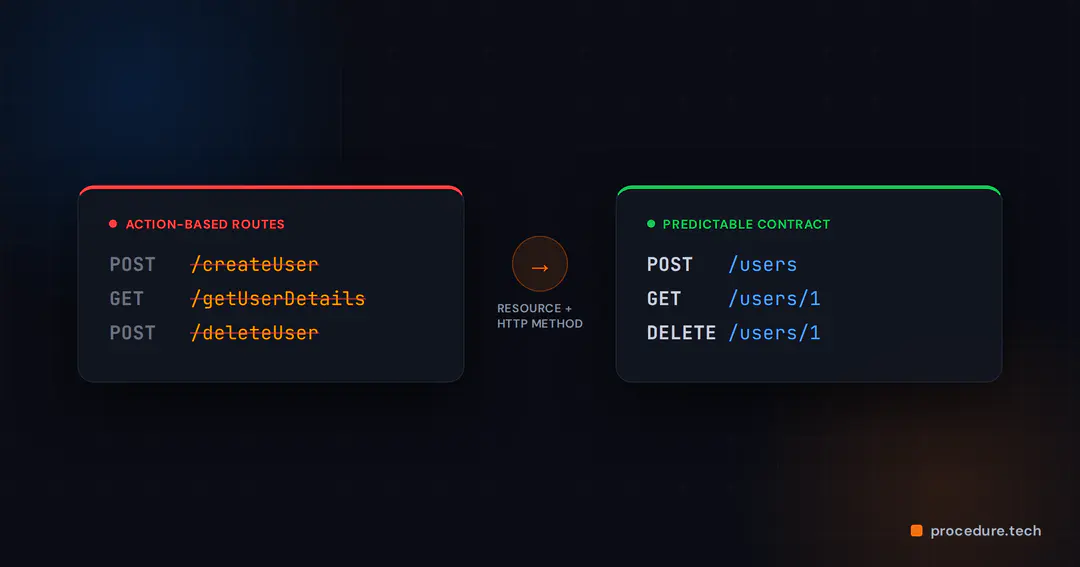
One of my earliest mistakes was naming endpoints around actions.
POST /createUser
GET /getUserDetails?id=1
POST /deleteUser
This felt readable at first because the action was written directly into the URL. But it created problems as the API grew.
The naming was inconsistent. The endpoint used verbs instead of resources. The URL did not follow a pattern that could scale across more entities. If one API used /createUser, another used /getUserDetails, and another used /deleteUser, the next developer had no clear convention to follow.
The implementation looked like this:
app.post('/createUser', (req, res) => {

const user = createUser(req.body);

res.json(user);

});

app.get('/getUserDetails', (req, res) => {

const user = getUserById(Number(req.query.id));

res.json(user);

});

app.post('/deleteUser', (req, res) => {

deleteUser(req.body.id);

res.json({ message: 'deleted' });

});
The better approach was to design the API around resources and let HTTP methods describe the action.
POST /users

GET /users/1

DELETE /users/1
And the implementation became cleaner:
app.post('/users', (req, res) => {

const user = userService.createUser(req.body);

res.status(201).json(user);

});

app.get('/users/:id', (req, res) => {

const user = userService.getUserById(Number(req.params.id));

res.json(user);

});

app.delete('/users/:id', (req, res) => {

userService.deleteUser(Number(req.params.id));

res.status(204).send();

});
The change is simple, but important.
POST /users creates a user.
GET /users/:id fetches a user.
DELETE /users/:id deletes a user.
The URL represents the resource. The HTTP method represents the action. That makes the API easier to read and easier to extend.
This also prevents misleading endpoint names. If an API is called getUserDetails, it should not return multiple users or behave like a search endpoint. Naming should match behavior because developers form expectations from the API surface before they ever read the implementation.
A good REST API endpoint should make three things clear: the resource, the action, and whether the response represents one item, many items, or an operation result.
2. Poor Naming: Shortcuts Created Confusion
Endpoint naming was not the only issue. Internal function naming also created confusion.
Earlier, I wrote code like this:
function getUser(id: number): any {
return db.find(id);
}
It worked, but it was vague.
getUser is not a clear name. id does not explain what kind of ID is expected. any removes useful type information. db.find does not tell the reader what entity is being searched.
The improved version was much easier to understand:
function getUserById(userId: number): User {

return userRepository.findById(userId);

}
This is not about making the code look more formal. It is about making the code easier to reason about.
getUserById says exactly what the function does. userId is more specific than id. User gives the caller a clearer expectation than any. userRepository.findById also signals that data access is being handled through a dedicated layer.
Good naming saves time because the next developer does not need to decode intent from context. That becomes especially important in backend API development, where unclear function names can spread into unclear services, unclear controllers, and eventually unclear API behavior.
3. Error Handling: Returning 200 for Failures Made the API Hard to Trust
Another big mistake was weak error handling.
Earlier, my API looked like this:
app.get('/users/:id', (req, res) => {

try {

const user = userService.getUserById(Number(req.params.id));

res.json(user);

} catch (e) {

res.json({ message: 'Something went wrong' });

}

});
The problem here is not only that the message is generic. The bigger issue is that this can still return 200 OK even when something fails.
That makes the API difficult for the frontend to handle. If every failure comes back as a generic response, the frontend has to guess what happened. Was the user missing? Was the input invalid? Did the server fail? Was the user unauthorized?
The fixed version handled expected failure more clearly:
app.get('/users/:id', (req, res, next) => {

try {

const user = userService.getUserById(Number(req.params.id));

if (!user) {

return res.status(404).json({

status: 404,

error: 'User Not Found',

message: `User with id ${req.params.id} does not exist`,

});

}

res.json(user);

} catch (e) {

next(e);

}

});
And the global error handler gave unexpected errors a standard structure:
app.use((err: any, req: any, res: any, next: any) => {

res.status(err.status || 500).json({

status: err.status || 500,

error: err.name || 'Internal Server Error',

message: err.message || 'Something went wrong',

});

});
This made the API easier to consume because the response started matching the real outcome.
If a user does not exist, return 404.
If input is invalid, return 400.
If the user is not allowed to perform an action, return 403.
If the server fails unexpectedly, return 500.
The exact error format can vary across teams, but the principle should not: the status code and response body should help the caller understand what happened.
This is especially useful for frontend and QA teams. Frontend developers can show better UI states when errors are specific. QA teams can test failure behavior more confidently when the API does not hide every problem behind the same generic message. The software testing and QA services cover this kind of validation and regression thinking across web, mobile, API, and workflow testing.
4. Mixed Responsibilities: My Route Handlers Were Doing Too Much
Another issue was putting too much logic inside the route handler.
This is the kind of code that becomes difficult to maintain:
app.get('/users/:id', async (req, res) => {

const user = await db.query('SELECT * FROM users WHERE id = ?', [req.params.id]);

if (!user) {

return res.status(404).json({ message: 'User not found' });

}

res.json(user);

});
Everything is mixed here: database query, business logic, and response handling.
For a small endpoint, this may not look like a major problem. But as the API grows, this pattern becomes painful. The route file becomes large. Testing becomes harder. Business rules are scattered. Changing the database logic risks affecting the HTTP layer. Changing the response shape risks touching code that should only care about persistence.
The better version separates responsibilities:
// controller

app.get('/users/:id', async (req, res, next) => {

try {

const user = await userService.getUserById(Number(req.params.id));

res.json(user);

} catch (err) {

next(err);

}

});

// service

async function getUserById(userId: number): Promise<User> {

const user = await userRepository.findById(userId);

if (!user) {

throw new NotFoundError(`User with id ${userId} not found`);

}

return user;

}

This split makes the code easier to reason about.
The controller handles HTTP.
The service handles business rules.
The repository handles data access.
That separation also helps onboarding. A new developer can open the controller to understand the API surface, the service to understand product behavior, and the repository to understand how the data is fetched.
This is not about adding layers for the sake of architecture. It is about keeping each part of the API responsible for one kind of decision. When that boundary is clear, future changes become less risky.
5. Consistency Across APIs: The Rules Matter More Than One Endpoint
After fixing individual APIs, the bigger realization was that consistency matters more than any single endpoint.
Earlier, every endpoint felt slightly different. One used verbs. Another used nouns. One returned raw data. Another returned wrapped data. One handled errors properly. Another returned a generic message. Each API worked in isolation, but together they made the system harder to use.
Now I try to follow a few simple rules:
Use nouns for resources, like /users and /orders.
Use HTTP methods for actions.
Use clear function names, like getUserById.
Use standard HTTP status codes.
Use structured error responses.
Separate controller, service, and repository responsibilities.
These rules are not complicated, but they create a shared language across the codebase.
Consistency also affects frontend development. If every API follows a predictable shape, the frontend can build reusable data-fetching patterns, shared error handling, and cleaner UI states. Procedure’s frontend development services focus on modern product frontends at scale, and that kind of frontend work becomes easier when backend APIs behave predictably.
6. Third-Party Integrations Need Honest API Behavior
The meeting discussion also brought up a common problem with third-party integrations: the API should not report success just because some internal step was completed.
For example, an e-commerce integration may generate a message or trigger a sync, but that does not always mean the downstream action succeeded. If the API returns 200 OK in every case, the frontend and support teams lose visibility into what actually happened.
This is where API design has to represent the real state of the operation.
For long-running or uncertain work, a direct success response may not be the right choice. The API may need to return an accepted state, a job ID, or a status that can be checked later. If some records succeed and others fail, the response should expose partial failure clearly instead of pretending the whole operation succeeded.
For example, instead of saying “sync successful” too early, the API can return a sync status:
{

"data": {

"syncId": "sync_123",

"status": "completed_with_errors",

"summary": {

"total": 120,

"synced": 112,

"failed": 8

}

}

}
This kind of response is more useful because it gives the product something honest to show.
The frontend can display progress. QA can test partial failure states. Support teams can inspect what failed. Backend jobs can retry the failed records safely.
Third-party API integration is not just about calling another system. It is about making uncertainty visible.
7. Tools Help, But They Do Not Replace API Design
Frameworks and tools make backend development easier, but they do not automatically create good APIs.
A framework can help you define routes. A validation library can help reject bad input. Documentation tools can describe your endpoints. OpenAPI can help teams document and share API contracts. But none of these tools can decide whether your endpoint name is misleading, whether your status code tells the truth, or whether your controller is doing too much.
That part still requires design judgment.
I have seen APIs with documentation that were still hard to use because the behavior itself was inconsistent. Documentation can explain a confusing API, but it cannot turn it into a clean one.
The better approach is to use tools to support good conventions, not replace them. Define the API structure clearly, keep naming consistent, document the contract, test the failure states, and review API changes with the same seriousness as product logic.
What Actually Improved After the API Refactor
The biggest improvement was not that the code looked cleaner. It was that the APIs became easier to work with.
Frontend integration became smoother because response structures were more predictable. Debugging became faster because errors started pointing to the actual problem. Adding new endpoints felt safer because there was already a pattern to follow. New developers could understand the API flow without relying on undocumented context.
These improvements are not always captured by one dramatic metric, but they are visible in day-to-day engineering work.
A good API refactor should reduce friction. You can measure that by looking at practical signals: fewer action-style endpoints, more consistent response structures, smaller route handlers, clearer error codes, fewer frontend-specific workarounds, and better test coverage around validation, not-found, permission, and third-party failure states.
That is the real value of API refactoring. It does not just make the backend cleaner. It makes the product easier to build on.
A Practical API Design Checklist
After going through these mistakes, I started reviewing APIs with a simpler question:
“Will this API still be easy to understand when someone else has to use it, test it, or change it later?”
That question helps me look beyond whether the endpoint works today. It pushes me to check whether the API will still be clear when the product grows, when another developer takes over, or when the frontend needs to handle more states.
The endpoint should represent a resource, not a random action. The HTTP method should describe what is happening. The name should match the actual behavior. A single-resource endpoint and a list endpoint should be clearly different.
The response structure should be predictable. Success responses should follow a consistent pattern. Errors should include useful information. List responses should include metadata when pagination matters.
Error handling should tell the truth. A missing resource should not look like a server crash. A validation issue should not come back as a generic failure. A failed third-party operation should not be hidden behind 200 OK.
The code behind the API should also be well-separated. Controllers should not become the place where every decision lives. Services should own their business behavior. Repositories should handle data access. Each layer should be understandable on its own.
This checklist is not meant to slow development down. It is meant to catch the small shortcuts that later become API debt.
Good APIs Feel Boring in the Best Way
The best APIs are usually not clever. They are predictable.
You can read the endpoint and understand the resource. You can look at the method and understand the action. You can inspect the response and know where the data or error will be. You can open the controller and quickly understand the HTTP flow. You can move to the service and find the business logic.
That kind of API design feels boring, but boring is good here.
Boring means the next developer does not have to guess. It means the frontend does not need special handling for every endpoint. It means QA can test failure states clearly. It means future changes feel safer because the structure is already understandable.
My APIs became better when I stopped treating them as quick routes and started treating them as contracts for other developers, including future me.
APIs do not need to be perfect from day one. But as a product grows, they need to become more consistent, more honest, and easier to change.
If your backend is becoming difficult to debug, or your frontend team needs too many endpoint-specific workarounds, the issue may not be the framework. It may be the API contract.
For teams building or modernizing production products, Procedure helps design backend systems, frontend integrations, and full product platforms that are built for long-term maintainability. Explore our product build services to see how we approach engineering from architecture to delivery.
If you found this post valuable, I’d love to hear your thoughts. Let’s connect and continue the conversation on LinkedIn.
Kshitij Kumar
SDE2
Kshitij Kumar is a Software Engineer specializing in backend systems, APIs, and e-commerce platforms. He works extensively with Node.js, TypeScript, Shopify, and modern cloud-based architectures, building scalable production-ready applications and integrations. With a strong focus on system design, clean code, and AI-assisted development workflows, Kshitij combines solid engineering fundamentals with practical experience delivering reliable software solutions in fast-paced environments.