
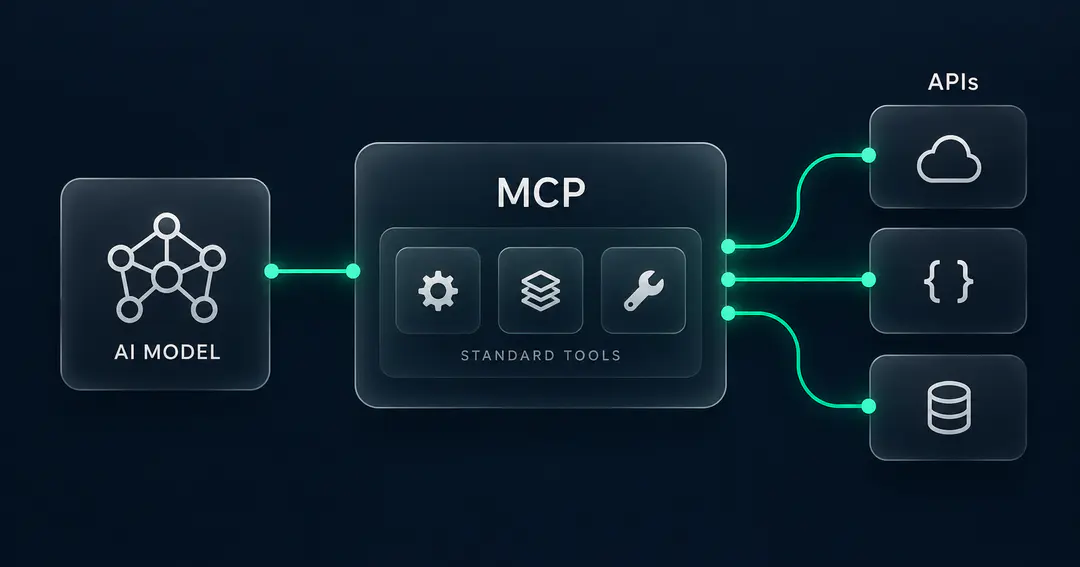
Summary: An API is how two pieces of software talk to each other. MCP (Model Context Protocol) is a standard for how an AI model discovers and calls tools, data, and actions. They are not competitors. An MCP tool usually wraps one or more APIs, and MCP gives the model one consistent way to act while the changing details of each API stay hidden behind a stable interface.
If you have used an LLM, you know the feeling. It writes the email, drafts the code, explains the plan, then stops. It cannot send the email or run the code. It talks, but it does not do.
That gap is the whole reason MCP exists. We gave a talk on it at our Mumbai Meets AI 2.0 meetup, built a small server live, and it broke in a couple of honest ways on stage. This post is that talk, cleaned up, with the working examples we promised people afterward.
What Is an MCP Server?
An MCP server is a program that exposes tools, readable data, and reusable prompts to an AI model through one standard protocol. The line Anthropic uses is that MCP is like USB-C: one standard connector instead of a different cable for every device. A provider can run its own MCP server, and your AI client speaks a single protocol to all of them.
One thing to clear up early, because it’s easy to blur. Say you ask an assistant to book a cab for next Friday. MCP does not turn “next Friday” into a date. The model does that. MCP is the standardized interface the model calls through once it has worked out the arguments.
Why AI Agents Need MCP, Not Just APIs
Picture a service that books cabs by aggregating several providers. Each provider has its own API, and you want one assistant that can compare and book across all of them.
Here is the problem. Say a provider exposes this today:
POST /v1/rides/estimate
{
  "pickup_lat": ...,
  "pickup_lng": ...,
  "dropoff_lat": ...,
  "dropoff_lng": ...
}
A conventional integration has to know that contract directly. Now the provider ships a change:
POST /v2/fare-quotes
{
  "origin": {...},
  "destination": {...}
}
Your integration breaks until you rewrite it. Multiply that across every provider and every time any of them changes anything, and you get brittle glue code that snaps in a different place every week.
MCP puts a stable layer in between. Instead of every client knowing each provider's raw contract, the MCP server exposes one steady tool:
get_ride_estimate(pickup, destination)and translates that internally into whatever the provider currently requires:
MCP client  ->  stable MCP tool  ->  provider API
                       ^
                  translation
When the provider changes its API, the server updates its translation once, and every client calling get_ride_estimate keeps working untouched. The provider owns their server, so they own their own changes. The brittleness moves from everyone who integrates to the one server that owns the tool.
MCP vs API: The Key Differences
They operate at different layers, so "which is better" is the wrong question.
| API | MCP | |
|---|---|---|
| What it connects | Software to software | An AI model to tools, data, and actions |
| Who calls it | A developer writes code that calls it | The model decides to call it at runtime |
| Interface | Whatever the provider designed | A single standard across every server |
| When the provider changes | Every caller updates their code | The server absorbs it behind a stable tool |
| Relationship | The thing being wrapped | The wrapper that exposes it to a model |
| Typical use case | Your own code makes a fixed, known call, like a backend fetching a fare estimate from one cab provider | A model has to choose the action at runtime, like an assistant comparing and booking cabs across several providers |
An MCP tool typically wraps one or more APIs. What MCP adds is a standard way for a model to discover what it can do and then act, without you hardwiring every call.
How to Build an MCP Server in Python
We built ours with Python and FastMCP. Full working code is in the demo repo. The shape is simpler than most people expect.
An MCP server exposes three kinds of thing. Back to the cab service to keep them apart:
- Tool:
get_ride_estimate(pickup, destination). A tool does something or fetches a result. Most of what you build will be tools. - Resource:
policy://cancellation-rules. A resource is information the model can read. Use one when the model needs context rather than an action. - Prompt:
book_ride(destination, ride_type). A prompt is a saved, parameterised starting point for a particular workflow.
The cab service was for explaining. On stage we built something smaller: a notes server with one tool to add a note and one to read notes. The pattern in FastMCP is a decorated function with a docstring (simplified, full version in the repo):
@mcp.tool()
def add_note(note: str) -> str:
    """Add a new note to the notes file."""
    ...
    return "note added"
The docstring is how the model decides when to use the tool. When we asked the client to "add a note that says 24 people are looking awkwardly at me," it matched that to add_note and passed the right argument purely from the function name and docstring. Write vague docstrings and the model picks the wrong tool.
MCP Server Limitations and Common Mistakes
Two moments in the live demo are worth slowing down for.
Asking for "the latest note" got the right answer, but the model first pulled back every note. The server had a tool that read all notes and nothing that scoped to the most recent one, so it read the full list and picked the latest from it. With a handful of notes, that's fine. With thousands, you're loading all of them into the model's context to answer a one-line question. The fix belongs in the server: expose a tool that does the narrow thing you want, and describe it precisely.
Asking it to delete a note, it refused, correctly. There was no delete tool, so the model had nothing to call and said so. A model can only do what you expose. Leaving out a destructive tool is a deliberate safety choice.
Taking an MCP Server to Production
The notes server runs locally over STDIO, which is perfect for one machine and one user. Making it reachable by a team changes the picture.
- Transport. Local STDIO becomes a networked transport (HTTP or SSE) once more than one client needs it, which brings back the web concerns STDIO let you ignore.
- Auth and secrets. A local server trusts whoever is at the keyboard. A shared one needs real authentication, and provider credentials have to live somewhere safe, not in the code.
- Destructive tools. The moment a tool can change or delete real data, "the model can call anything it can see" stops being cute. You gate those tools, and you think hard about which ones should exist at all.
None of this is exotic. It is the same jump every production AI system makes from "runs on my laptop" to "runs for a team."
Have questions about building MCP servers or want to talk through what you're wiring up? Reach out to me on LinkedIn.
MCP vs API FAQ
What is an MCP server? A program that exposes tools, readable resources, and reusable prompts to an AI model through the Model Context Protocol, so the model can take real actions through one standard interface.
Is MCP a replacement for APIs? No. MCP sits on top of APIs. An MCP tool usually calls one or more APIs under the hood. APIs connect software to software, while MCP gives a model a standard way to discover and use those tools.
Is MCP slower than an API? Usually a little. There is an extra hop while the model chooses a tool and the server translates to the underlying call, and the tool definitions take up space in the model's context. For most agent work that overhead is small next to the model's own thinking time.
Do I need to build my own MCP server? Only if you want a model to act on a system that does not already have one. Many providers ship their own. If yours does not, a basic server is a small amount of code.
How does the model decide which tool to call? From the tool's name and docstring. If the description is vague or the right narrow tool does not exist, the model picks the closest match, which is why it read every note in our demo just to find the latest one.
Building agents that need to do more than talk? That is the work our pods do: production AI agents and the MCP tooling around them, embedded in your repo and owning the outcome. If it is on your roadmap, that is a good place to start a conversation.
Swapnil Talpade
SDE-2
Swapnil Talpade is an SDE-2 focused on full-stack engineering and building scalable, impactful software. He enjoys tackling challenging engineering problems and creating solutions that help businesses work smarter and more efficiently. Beyond code, he finds his balance in running, trekking, and exploring the outdoors.