
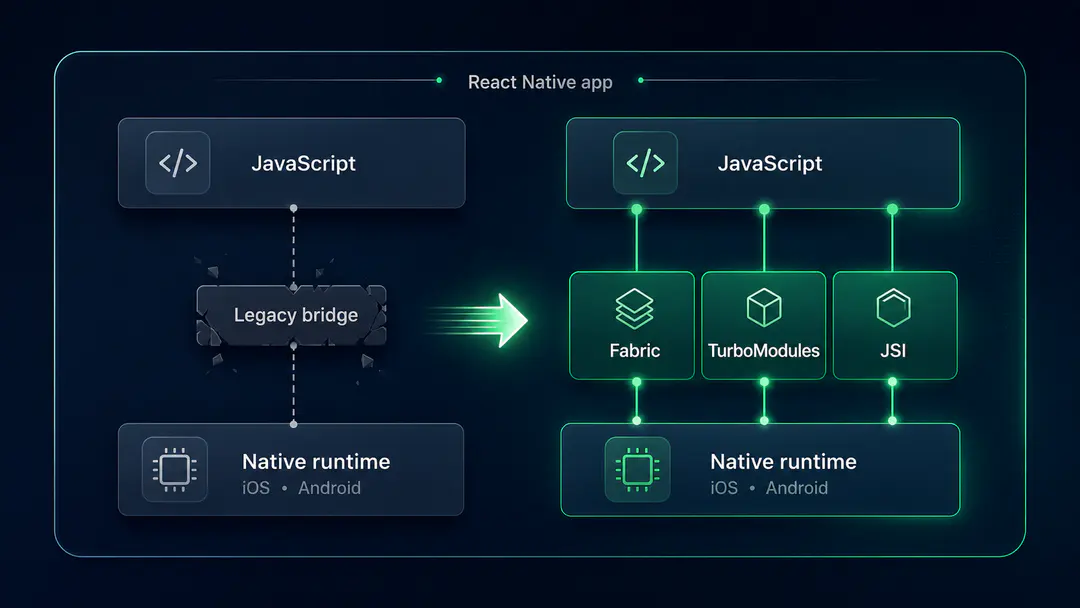
The React Native New Architecture has been talked about for years, and most of that talk happened while it was still optional. That window closed in late 2025. React Native 0.82 shipped without the ability to disable the New Architecture, and Expo SDK 55 followed by removing the opt-out flag from app config entirely. Teams that were planning to migrate "next quarter" are now looking at a forced upgrade path the next time they need to bump React Native for security patches or new features.
The useful question is no longer whether to migrate. It is what changes when you do. The Fabric renderer, TurboModules, and bridgeless mode are the architectural shifts, but the production reality is more granular: a third-party library audit that often surprises teams, a set of breaking changes that did not exist on the legacy architecture, a new debugging surface, and a Hermes V1 opt-in worth understanding. This guide covers what production teams actually run into after the upgrade, and how to sequence the work so the migration does not stall.
The React Native New Architecture replaces the legacy JavaScript bridge with three components: the Fabric renderer for UI, TurboModules for native module access, and JSI (JavaScript Interface) for direct, synchronous communication between JavaScript and native code. As of React Native 0.82 (October 2025), this is the only architecture available. Expo SDK 55 and later have removed the option to disable it. For production teams, the migration is now mandatory on the next major React Native upgrade, and the engineering work is concentrated less in the framework migration itself and more in auditing and replacing third-party native modules that have not been updated for the New Architecture. Most teams complete the migration in two to eight weeks once the dependency audit is done, depending on how much custom native code is involved.
What the React Native New Architecture Actually Changes
The React Native New Architecture is the umbrella term for three separate but related changes: the Fabric renderer, TurboModules, and JSI. Each replaces a specific component of the legacy architecture, and each has a different production impact. Understanding which is which matters because debugging an issue after migration requires knowing which layer it came from.
Fabric: The New Renderer
Fabric is the new UI layer. The legacy renderer (Paper) maintained the UI shadow tree in JavaScript and synced changes to native views asynchronously through the bridge. Fabric moves the shadow tree to C++, which means layout calculations and view updates happen synchronously on the UI thread without crossing the JS/native boundary for every operation.
Three things change visibly in production code. Layout measurement is now synchronous, so measure() and measureInWindow() return values directly instead of through a callback. Touch events are handled without bridge round-trips, which removes a class of latency that older RN apps lived with. And the long-deprecated setNativeProps API, which let JavaScript imperatively mutate native view props, is gone. Apps that relied on setNativeProps for animations or scroll position management need to refactor to state-driven patterns.
The Fabric renderer also enables React's concurrent features in React Native. useTransition, Suspense, and automatic batching now work the way they do on the web. For teams already using these patterns in React, the mental model transfers directly.
TurboModules: Lazy-Loaded Native Modules
TurboModules replace the legacy NativeModules API. The change that matters most: native modules now load on first use instead of all at once at app startup. The legacy architecture initialised every registered native module when the app launched, regardless of whether the user ever interacted with that feature. For an app with twenty native modules, that was twenty initialisation costs paid every cold start.
TurboModules load lazily through TurboModuleRegistry.get(). A camera module is not initialised until the user opens the camera screen. The cold start improvement is real: production teams report cold start regressions from the legacy architecture in the 30 to 50 percent range when migrating, though numbers vary by app and how many modules are in use.
TurboModules are also type-safe. The interface is defined in TypeScript, and Codegen produces native bindings from that schema. A mismatch between what JavaScript sends and what native expects fails at compile time instead of at runtime, which removes one of the most common bug surfaces in legacy native module work.
JSI and Bridgeless Mode
JSI is the foundation that Fabric and TurboModules sit on. It replaces the asynchronous JSON-serialised bridge with a direct C++ interface that JavaScript can call into synchronously. Bridgeless mode, which became default in React Native 0.78 and is the only mode available in 0.82, removes the legacy bridge object entirely. There is no longer a global bridge that native modules can reach into for context, no JSON serialisation between layers, and no bridge thread queue that operations have to pass through.
For application code, bridgeless mode is mostly invisible: the React components and hooks look the same. For native module authors and library maintainers, it requires rewriting any code that accessed the bridge directly. This is one of the main reasons third-party library compatibility has been the sticking point for migrations.
The Third-Party Library Audit Is the Migration
For most teams, the React Native New Architecture migration is not really a framework migration. It is a third-party native module audit. The framework upgrade itself is mechanical. The work is finding out which of your dependencies have shipped New Architecture support and which have not.
How to Run the Audit
The practical starting point is the React Native Directory, which tracks New Architecture compatibility for the most-used libraries. Filter by the New Arch badge and cross-reference against your package.json. The directory is incomplete, particularly for smaller or specialised libraries, so you will also need to check repositories directly for libraries it does not list.
A more reliable check is the React Native New Architecture Working Group. The working group maintains migration documentation and tracks library compatibility issues. For libraries with active maintainers, the New Architecture support story is usually documented in the README or a recent release note.
The categories that matter for the audit:
- Compatible and tested. The library autolinks under the New Architecture and works without code changes. Most actively maintained core libraries (React Navigation, Reanimated, Gesture Handler, Expo SDK packages) fall here as of 2026.
- Compatible via interop layer. The library has not been rewritten for TurboModules but works because React Native maintains an interop layer that bridges legacy native modules into the new system. This works for now but is on borrowed time. The interop layer is documented as staying "for the foreseeable future" but not permanently. Plan to migrate.
- Incompatible. The library has not been updated, autolinking fails, or the build breaks under the New Architecture. These are the libraries that determine your migration timeline.
What to Do With Incompatible Libraries
An incompatible third-party library in 2026 is a fork-or-replace decision. Three paths:
- The maintainer is active but has not shipped New Architecture support yet. File or comment on a GitHub issue, check the roadmap, and wait if you can. This is the lowest-effort path and works for libraries with healthy maintainership. The risk is timeline: "next release" sometimes means six months.
- The maintainer is inactive. Look for an active fork. Many popular but stale libraries have community forks that have shipped New Architecture support. Switching to the fork costs a
package.jsonchange. - No fork exists. You either rewrite the native module yourself as a TurboModule or replace it with a different library. Rewriting is straightforward if you understand the native code, but it is the expensive path.
The practical signal that determines migration scope: count the libraries in your dependency tree that fall into each category. If most are in the first two categories, the migration is a two-to-four-week project. If a load-bearing library is in the third category and you have to rewrite or replace it, double or triple that estimate.
Breaking Changes That Surface Only in Production
The New Architecture is not a behavioural drop-in for the legacy architecture. Most production code works without changes, but a handful of patterns break in ways that are not caught by the test suite and only surface under real device conditions.
setNativeProps Is Gone
setNativeProps was the imperative API that let JavaScript mutate a native view's props directly without re-rendering. It was used most often for animation values that needed to bypass React's render cycle and for scroll position management.
In the New Architecture, setNativeProps has no effect. Code paths that relied on it silently fail, which is the worst class of breakage because the app does not crash, it just does the wrong thing. The fix is to refactor to state-driven patterns or to use Reanimated for animations, which uses its own UI-thread runtime and is the recommended replacement for any animation work that previously used setNativeProps.
Synchronous Layout Measurement
In the legacy architecture, layout measurement was asynchronous: measure() took a callback that fired after the native side returned the values. In the New Architecture, measurement is synchronous and returns values directly. Most code does not rely on the asynchronous timing of the legacy callback, but some patterns do, particularly around triggering side effects after measurement completes. These need to be revisited.
Event Handling Timing
Touch event handling in the legacy architecture went through the bridge, which introduced a small but measurable delay. In the New Architecture, events are handled synchronously without that delay. The behavioural change is subtle: gesture handlers and rapid-fire touch interactions can produce different results because timing has tightened. Apps with custom gesture logic should regression-test on the New Architecture before assuming behavioural parity.
Hermes Is Required
The New Architecture is built on JSI, which depends on Hermes-specific capabilities. Apps that opted out of Hermes and used JavaScriptCore will not work on the New Architecture. The fix is to switch to Hermes, which is the default and has been since React Native 0.70. For apps that explicitly chose JavaScriptCore for compatibility reasons, this is now a forced choice.
Hermes V1: The Opt-In Worth Knowing About
React Native 0.82 introduced an opt-in to Hermes V1, the next-generation version of the Hermes engine. Hermes V1 is not the default yet. It ships behind a flag, with the team gathering production signal from teams willing to opt in.
The pitch is performance: faster bundle loading, lower Time to Interactive, and improved bytecode caching. The internal Meta numbers reported in the release announcement showed measurable cold start improvements, though as with any synthetic benchmark, real-world impact varies by app shape.
The tradeoff is maturity. Hermes V1 is experimental, behaviour can differ from Hermes in subtle ways, and not every library has been tested against it. For apps where cold start is a tracked metric and the engineering team has bandwidth to investigate edge cases, opting in produces meaningful wins. For apps that need stability, waiting until Hermes V1 becomes the default is the right call.
The practical advice: if you are already running a beta channel or have a feature-flagged subset of users, ship Hermes V1 there first. Measure cold start, TTI, memory footprint, and crash rate against the Hermes baseline. If the numbers hold, expand. If something breaks, the rollback is one config change.
A Sequenced Migration Path That Ships
The migrations that go cleanly tend to follow the same shape. The ones that stall usually skip the audit step or try to do everything at once.
Step 1: Get to React Native 0.81 First
If the app is on React Native 0.74 or earlier, the migration target is not the latest version. It is React Native 0.81, the last version that supports the Legacy Architecture. Upgrade to 0.81 first, with the New Architecture still disabled, and confirm the app builds and runs. Each minor version between your current version and 0.81 has its own breaking changes, and skipping versions produces compounding errors that are hard to attribute.
React Native 0.81 also includes warnings and migration helpers specifically designed to support the next step. These do not appear in earlier versions, which is why the recommendation is to land on 0.81 first rather than going directly to 0.82.
Step 2: Run the Library Audit
With the app on 0.81 and the Legacy Architecture still active, run the dependency audit described above. Document each library in the three categories: compatible, interop-only, incompatible. For incompatible libraries, decide the path: wait for maintainer, switch to fork, or rewrite.
This step is where the migration timeline is set. Until the incompatible libraries have a path forward, enabling the New Architecture will fail the build.
Step 3: Enable the New Architecture in 0.81
React Native 0.81 is the version where you can run the New Architecture and still fall back to the Legacy Architecture if something fails. Set newArchEnabled=true on Android (gradle.properties) and RCT_NEW_ARCH_ENABLED=1 on iOS (Podfile), or set the relevant Expo config flag. Run the app, fix issues, and ship to a beta channel.
This is the step where the breaking changes from the previous section surface. setNativeProps failures, gesture timing differences, missing TurboModule conversions: all of them show up here. Fix them under the safety net of being able to roll back to the Legacy Architecture if the rollout goes sideways.
Step 4: Upgrade to 0.82
Once the app is stable on 0.81 with the New Architecture, the upgrade to 0.82 is mechanical. The Legacy Architecture is no longer available in 0.82, so the option is gone, but at this point you are not relying on it. The 0.82 upgrade brings in the version that has the rest of the ecosystem moving toward (React 19.1.1, DOM Node API support, the Hermes V1 opt-in) without the architectural risk.
Step 5: Decide on Hermes V1
With the app stable on 0.82 with the New Architecture, the Hermes V1 opt-in is a separate decision. For most apps, the answer is to wait for it to become default. For apps where cold start or TTI are tracked metrics and there is bandwidth to investigate issues, opting in to a feature-flagged subset of users is the path.
Five Mistakes That Stall React Native New Architecture Migrations
These come up consistently in the public migration write-ups and the GitHub issues teams open during the upgrade.
1. Skipping versions. Going from React Native 0.74 directly to 0.82 produces obscure build failures that are hard to attribute to a specific change. Each minor version between has its own migration notes, and the time saved by skipping is paid back in debugging.
2. Not running the dependency audit before enabling the New Architecture. Teams that flip the flag without auditing find out about library incompatibility through a failing build, which gives them no time to choose between waiting, forking, or rewriting. Audit first, decide the path, then enable.
3. Treating the interop layer as permanent. Libraries that work via interop will eventually stop working as core APIs evolve. The interop layer is a transitional tool, not a long-term solution. Plan to replace interop-only libraries even if they currently work.
4. Assuming the test suite catches the breaking changes. setNativeProps failures, synchronous measurement timing changes, and gesture timing shifts often do not produce test failures. They produce subtle behavioural differences that show up in QA on real devices. Manual regression testing on production-shaped flows is not optional.
5. Opting in to Hermes V1 alongside the architecture migration. Stacking two experimental changes makes it impossible to attribute issues. Migrate to the New Architecture first, stabilise, then evaluate Hermes V1 as a separate decision.
Wrapping Up: What Matters Most for the New Architecture in Production
The React Native New Architecture is not the migration teams thought it would be. The framework changes are mostly mechanical. The breaking changes are real but manageable. The work that determines whether the migration ships in two weeks or two quarters is the third-party library audit, and the discipline of doing the upgrade in sequenced steps rather than all at once.
The teams that ship cleanly do four things: they get to React Native 0.81 first as a stable baseline, they run a real dependency audit and decide the path for each incompatible library before enabling the New Architecture, they treat the breaking changes as a manual regression test rather than relying on automated tests, and they keep the Hermes V1 opt-in as a separate decision after the architecture migration is stable. None of this is exotic. It is the basics, applied with discipline.
If you are weighing a React Native upgrade for an existing production app and want a second opinion on the audit, the migration sequence, or the architecture decisions on the other side, take a look at how we approach React Native development.
Frequently Asked Questions
What is the React Native New Architecture?
The React Native New Architecture replaces the legacy JavaScript bridge with three components: the Fabric renderer for UI, TurboModules for native module access, and JSI (JavaScript Interface) for direct, synchronous communication between JavaScript and native code. It became the default in React Native 0.76 and the only available architecture in 0.82.
Do I need to migrate to the React Native New Architecture?
Yes, if you plan to upgrade React Native. As of version 0.82 (October 2025), the Legacy Architecture cannot be enabled. Expo SDK 55 and later have removed the opt-out flag entirely. The next React Native upgrade for most apps is also a forced New Architecture migration.
How long does a React Native New Architecture migration take?
Most migrations take two to eight weeks. The variable is the third-party library audit. Apps where all dependencies are already New Architecture-compatible can complete the upgrade in days. Apps with one or more incompatible load-bearing libraries that need to be replaced or rewritten as TurboModules can take several months.
What is the difference between Fabric and TurboModules?
Fabric is the new UI renderer. It replaces the legacy Paper renderer and moves the shadow tree to C++ for synchronous layout and rendering. TurboModules is the new native module system. It replaces the legacy NativeModules API and adds lazy loading, type safety via Codegen, and direct JSI-based access to native code.
Is React Native bridgeless mode the same as the New Architecture?
Bridgeless mode is part of the New Architecture but not the entire thing. It refers specifically to removing the legacy bridge object that JavaScript and native code communicated through. Bridgeless mode became default in React Native 0.78 and is the only mode available in 0.82. The New Architecture also includes Fabric and TurboModules.
What breaks when I migrate to the React Native New Architecture?
The most common production breakages are: setNativeProps no longer works (refactor to state-driven patterns or Reanimated), some asynchronous layout measurement patterns now run synchronously, gesture timing changes can produce different results in custom gesture logic, and apps that opted out of Hermes will not run on the New Architecture because JSI requires Hermes.
Should I opt in to Hermes V1?
Hermes V1 ships as an opt-in in React Native 0.82 with measurable cold start and TTI improvements but experimental status. For apps where cold start is a tracked metric and the team has bandwidth to investigate edge cases, opting in on a feature-flagged subset of users is reasonable. For most apps, waiting until Hermes V1 becomes the default is the safer call.
Procedure Team
Engineering Team
Expert engineers building production AI systems.