
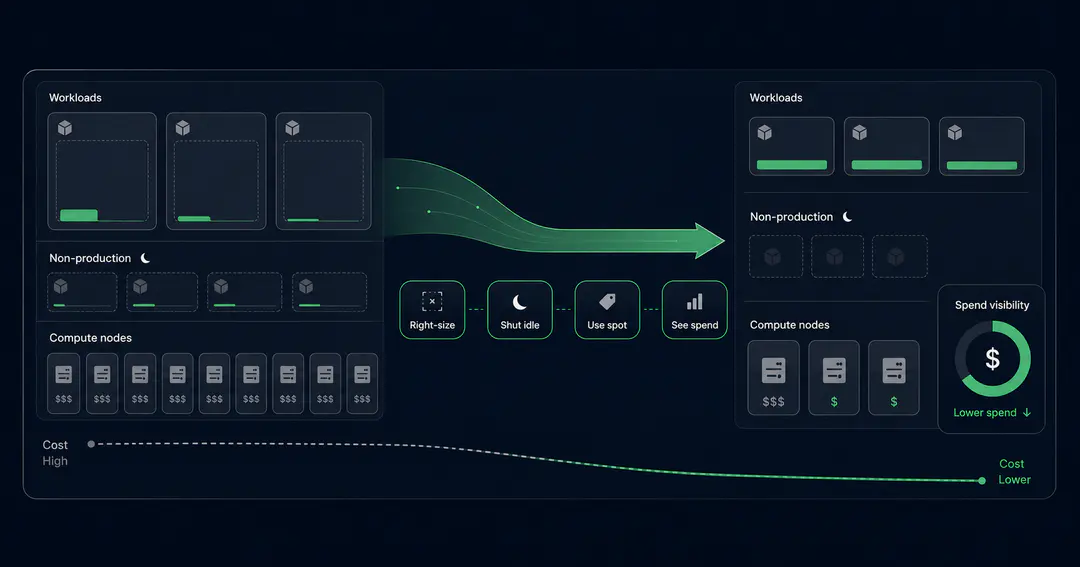
Kubernetes does not really have a cost problem. It has a visibility problem that turns into a cost problem.
The bill is rarely high because you are running too much real traffic. It is high because the cluster reserves far more CPU and memory than your workloads actually use, idle environments run all night, and nobody can see which team or service is responsible for what. The money leaks in quiet, boring ways, and most of it is recoverable without touching a single line of application code.
This guide breaks down the four places engineering teams lose money on Kubernetes, and a prioritized way to get it back. It is written for the people who own the cloud bill and the platform engineers who actually apply the changes.
Why Are Kubernetes Costs So High? The Short Answer
Kubernetes costs are usually high because of waste, not scale. Most clusters reserve two to five times more CPU and memory than their workloads use, because teams set resource requests defensively and never revisit them. On top of that, idle development and staging environments run around the clock, orphaned disks and load balancers keep billing after the workloads are gone, and almost everything runs on full-price on-demand capacity. The fix is not a bigger budget. It is right-sizing, smarter scheduling, and cost visibility.
Where the Money Actually Goes: Four Loss Vectors
Before optimizing anything, it helps to know where Kubernetes spend leaks. Almost every overspending cluster loses money in the same four places:
- Over-provisioned resource requests: pods reserve far more than they use, so nodes fill up on paper while sitting idle in practice.
- Idle and orphaned resources: development and staging environments running every night and weekend, plus disks, load balancers, and namespaces nobody cleaned up.
- Paying on-demand for everything: running fault-tolerant and batch workloads on full-price capacity instead of spot or committed pricing.
- No cost visibility: no per-team or per-namespace breakdown, so no one can see or own what they spend.
The rest of this guide takes them one at a time, starting with the one that wastes the most.

Loss Vector 1: Over-Provisioned Resource Requests
This is almost always the biggest line item, and the least visible.
Kubernetes schedules pods based on their resource requests, not their actual usage. If a pod requests 2 CPU and 4 GB of memory but uses 200 millicores and 500 MB, the scheduler still reserves the full amount. The node looks full. You add more nodes. You pay for capacity that nothing is using.
The cause is human, not technical. Teams set requests defensively, copy them between services, and never revisit them once the service is stable. The defensive padding becomes permanent.
The fix is right-sizing, and the only honest way to do it is from real usage data. You need actual CPU and memory consumption over a representative window, including peaks, before you can set requests that are tight but safe. This makes right-sizing a monitoring problem first and a cost problem second. If you are building that measurement layer, our guide on Prometheus monitoring at scale covers the usage data you need to size workloads properly.
A few tools make this practical:
- The Vertical Pod Autoscaler in recommendation mode shows suggested requests without changing anything.
- Goldilocks wraps VPA in a dashboard so you can scan recommendations across namespaces.
- KRR by Robusta reads your existing Prometheus metrics and produces right-sizing suggestions that are aware of how HPA is configured.
A reasonable baseline is to set CPU requests near your P95 usage and memory near P99, then adjust from there. Memory is the one to respect, because a pod that exceeds its memory limit gets killed, while CPU is only throttled.
One newer development is worth knowing. Kubernetes now supports in-place pod resizing, which lets you change CPU and memory on a running pod without restarting it. That removes a lot of the friction that made right-sizing feel risky. Check the feature status against your cluster version before you depend on it in production, because the exact behavior has shifted across recent releases.
Loss Vector 2: Idle and Orphaned Resources
The second leak is the one everyone recognizes and nobody owns.
Development and staging environments are the usual offenders. They get provisioned to match production, then left running every night and every weekend, doing nothing. An environment that only needs working hours sits idle for roughly two-thirds of the week. Scaling those workloads to zero off-hours, or shutting whole environments down on a schedule, is one of the easiest wins available.
Then there is the debris. Persistent volumes left behind after their pods are gone. Load balancers from deleted services that still bill by the hour. Old namespaces from experiments that ended months ago. None of it shows up in a demo, and all of it shows up on the invoice.
The structural fix is to make waste visible and accountable. Namespace-level resource quotas give each team a budget they can see, and stop a single workload from quietly consuming a whole cluster. Quotas do not cut cost directly, but they create the ownership that makes everything else stick. This same mechanism does double duty for workload isolation, which we cover in our guide on Kubernetes multi-tenancy.
Loss Vector 3: Paying On-Demand for Everything
Most teams run their entire cluster on on-demand instances, which is the most expensive way to buy compute.
A large share of Kubernetes workloads are fault-tolerant by design. Stateless services with multiple replicas, batch jobs, CI runners, and queue workers can all tolerate a node disappearing, because Kubernetes reschedules them. Those are exactly the workloads that belong on spot capacity, which runs well below on-demand price. The trick is to keep at least two replicas, set Pod Disruption Budgets, and spread across instance types so a single spot reclamation does not take a service down.
Modern node provisioning makes this far easier than it used to be. Karpenter watches for unschedulable pods and launches right-sized nodes in response, then consolidates workloads onto fewer nodes as demand drops. That consolidation step alone recovers a lot of waste, because it keeps bin-packing instead of leaving half-empty nodes running. Pairing spot-eligible workloads with consolidation is one of the highest-leverage changes most teams can make.
There is a second lever hiding here: architecture. Migrating workloads to ARM-based instances such as AWS Graviton often cuts compute cost for the same performance, and most container workloads run on ARM with little more than a multi-arch image build.
Be honest about what stays on-demand: database primaries, anything with long startup times, single-replica services, and workloads with no disruption budget. Spot is a tool for the fault-tolerant majority, not a religion.
Loss Vector 4: No Cost Visibility
You cannot cut what you cannot see, and Kubernetes makes spend genuinely hard to see. A cloud bill tells you that you spent money on compute. It does not tell you that the payments team's staging namespace cost more than its production one.
This is the gap that Kubernetes FinOps practices close. OpenCost, a CNCF project, allocates real cost down to the namespace, workload, and label level, so spend maps to the teams and services that created it. Once each team can see its own number, two things happen: the obvious waste gets cleaned up without a mandate, and right-sizing stops drifting back, because someone is now watching the trend.
The principle is simple. Treat cost like latency. Measure it before and after every change, attribute it to an owner, and review it on a regular cadence. Optimization that is not measured silently reverts.
The Autoscaler Footgun: When VPA and HPA Fight
Here is the mistake that catches teams who are doing everything else right.
The Horizontal Pod Autoscaler adds and removes pod replicas based on load. The Vertical Pod Autoscaler changes the CPU and memory requests of individual pods. Point both of them at the same CPU metric and they fight. VPA raises the CPU request, which changes the utilization math HPA uses, which triggers scaling, which feeds back into VPA. The result is a workload that scales in circles and costs more, not less.
The fixes are well understood. Let HPA scale on CPU and let VPA manage memory only. Or run VPA in recommendation mode and apply its suggestions by hand. Or move to event-driven scaling with KEDA when your load maps to a queue depth or an external metric rather than raw CPU. The same caution applies to running Karpenter and Cluster Autoscaler together, which can double-provision when both try to add nodes.
This is the kind of detail that separates a cost program that holds from one that quietly breaks the week after you finish it.
The Playbook: Highest-ROI Changes First
If you do these in order, you capture most of the savings early and avoid the common traps:
- Right-size resource requests from real usage data. Biggest win, lowest risk. Start with the largest workloads.
- Shut down or scale idle non-production environments off-hours.
- Move fault-tolerant workloads to spot, and turn on Karpenter consolidation.
- Migrate suitable workloads to ARM and Graviton.
- Add cost visibility with OpenCost, attributed per namespace and team.
- Lock the gains in with resource quotas and an admission policy, for example Kyverno, that blocks unbounded or oversized requests from creeping back.
The first two items usually deliver the majority of the savings, and neither requires new tooling spend.
It is common for teams optimizing for the first time to recover a large share of their Kubernetes bill, often somewhere between a third and a half, mostly from right-sizing and spot. The exact number depends entirely on how over-provisioned you started. The point is that the money is almost always there, and it is almost always hiding in the same four places.
If you want a second set of eyes on where your cluster is leaking, Procedure's team can help with a cost and reliability assessment of your Kubernetes setup. Sometimes the answer is a quick right-sizing pass. Sometimes it is a node strategy change. Either way, you will know where the money is going before you spend more of it.
Procedure's platform engineering team runs Kubernetes cost and reliability work across production environments. Follow our engineering work on LinkedIn.
Frequently Asked Questions
How much can you save with Kubernetes cost optimization?
It depends on how over-provisioned you start, but teams optimizing for the first time often recover a large portion of their bill, commonly a third or more. Most of that comes from two changes: right-sizing resource requests to match real usage, and moving fault-tolerant workloads to spot capacity. The more defensively your requests were set, the bigger the recoverable waste.
What is the single biggest cause of Kubernetes overspend?
Over-provisioned resource requests. Kubernetes reserves capacity based on what pods request, not what they use, so padded requests force you to run and pay for nodes that sit mostly idle. Right-sizing from actual usage data is almost always the highest-return change you can make.
Should I run production workloads on spot instances?
Yes, for the fault-tolerant ones. Stateless services with multiple replicas, batch jobs, and queue workers handle spot well if you set Pod Disruption Budgets and spread across instance types. Keep database primaries, single-replica services, and long-startup workloads on on-demand or committed capacity.
Can VPA and HPA run on the same workload?
Not on the same metric. If both act on CPU, they create a feedback loop that scales erratically. The safe pattern is to let HPA scale on CPU while VPA manages memory only, or to run VPA in recommendation mode and apply changes manually.
Procedure Team
Engineering Team
Expert engineers building production AI systems.