
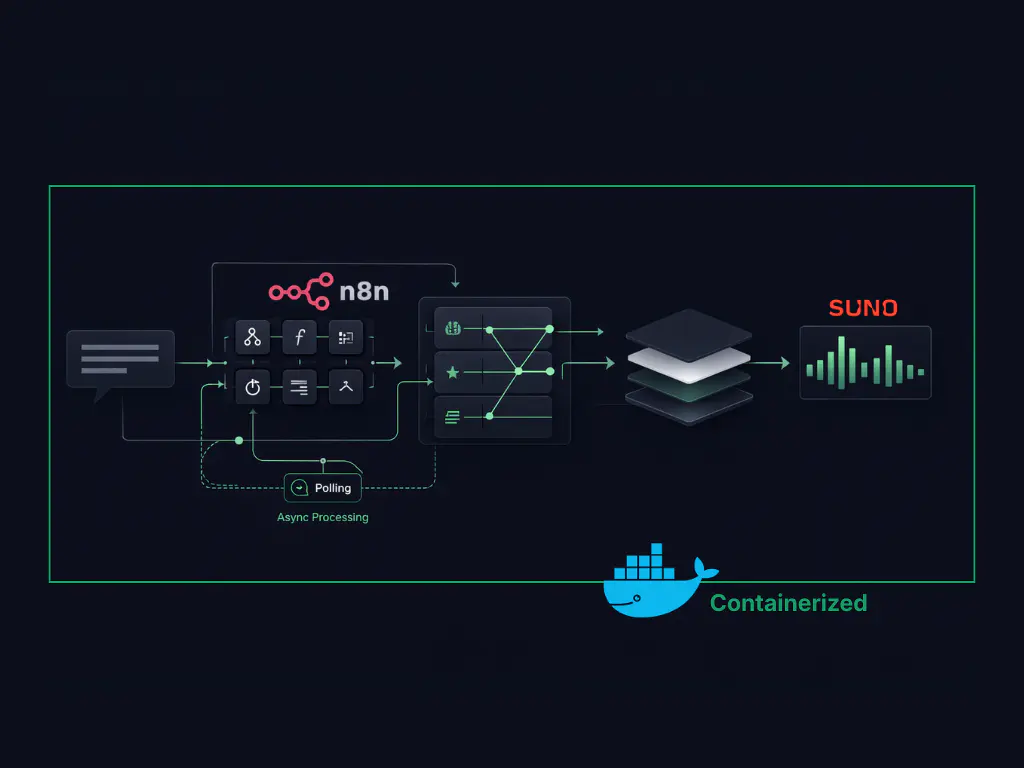
Building a production-ready AI music generation system is very different from running a one-step demo.
In practice, it’s a workflow problem. Music requests are ambiguous, and turning a single message into a consistent, usable output requires more than a model call; it requires structured orchestration.
This project started as a small experiment to explore that gap. The goal wasn’t to generate music once, but to build a system that could accept real user input, interpret intent, and reliably produce music through connected tools and APIs.
In this blog, I break down how a simple Telegram message flows through a self-hosted automation setup, an AI agent, and a music generation API, and what’s required to make that flow work outside a demo.
What You'll Need
- n8n (self-hosted via Docker)
- ngrok with a static domain
- A Telegram Bot (via BotFather)
- Suno AI API access (V5 model)
- Google Gemini 2.5 API key
- Docker and Docker Compose
What n8n Is and Why It Fits AI Workflow Automation
n8n is an open-source, self-hosted workflow automation tool that lets you connect APIs and services using a visual, node-based flow.
At a basic level, it works on a simple idea: when something happens → run a defined sequence of actions.
What makes n8n a good fit for this project is not the UI, but the control it offers. Being self-hosted means the workflow, data, and execution logic stay under your ownership. Being API-first means it works just as well with custom services, AI models, and internal tools as it does with popular SaaS products.
I chose n8n over alternatives like Zapier mainly because I was already comfortable with how it models workflows and handles branching logic. For a system that needs to interpret intent, apply rules, and call multiple APIs in sequence, that flexibility matters more than polish.
In short, n8n acts as the backbone of the system - the layer that turns a user message into a controlled, repeatable execution flow.
System Architecture: From Telegram Message to Music Output
At a high level, the system is simple.
A user sends a text message to a bot on Telegram describing the kind of music they want. That message becomes the input event for the workflow.
From there:
- n8n receives the message
- An AI agent interprets the intent and structures it
- The structured configuration is sent to Suno AI
- The generated audio is returned and sent back to the user on Telegram
Each step is isolated and explicit. The messaging layer only handles input and output. The agent focuses on interpretation and rules. The music model is used strictly for generation.
This separation is intentional. It keeps the system predictable, easier to debug, and easier to extend without changing the entire flow.
Before getting into the workflow details, it’s important to understand how this setup runs locally, and why messaging platforms don’t work with local systems out of the box.
Running n8n Locally with Docker and the Webhook Constraint
For this setup, n8n is running inside a Docker container on my local machine. This works well for development, but it introduces a problem when external platforms need to talk back to it.
Platforms like Telegram rely on webhooks to deliver messages. Webhooks must point to a publicly accessible HTTPS URL. Local addresses like localhost or private IPs are simply rejected.
This means that even if the workflow is correct, messages from Telegram will never reach n8n unless the local system can be exposed securely to the internet.
Until that gap is solved:
- The bot cannot receive user messages
- The workflow never triggers
- Nothing downstream runs
Fixing this requires adding a secure public entry point in front of the local n8n instance, without moving the system to the cloud.
That’s where the next piece comes in.
Exposing Local n8n Securely Using a Static HTTPS URL
To make the local n8n instance reachable by external webhooks, I used ngrok.
ngrok exposes a local server through a secure HTTPS URL and forwards incoming requests to the local machine. This immediately solves the “localhost is not allowed” problem.
For this setup, a static domain was important. Telegram webhooks expect a stable endpoint, and changing URLs would require reconfiguring the bot every time the tunnel restarts.
Once the static HTTPS URL was in place:
- Telegram could successfully send messages to n8n
- The workflow started triggering as expected
One additional fix was needed. When running n8n in Docker, the public URL must also be configured as the editor base URL. Without this, webhook registrations can silently fail even though the tunnel is active.
After setting the static domain correctly in both ngrok and n8n:
- Incoming messages were reliably received
- The local setup behaved like a production endpoint
With connectivity solved, the next decision was choosing where users would interact with the system.
Why Telegram Works Well as an AI Interface Layer
Telegram was chosen mainly for its flexibility.
It allows easy creation of custom bots, has a straightforward webhook model, and doesn’t impose heavy restrictions on how messages are handled. That makes it a good fit for experimenting with AI-driven workflows where inputs can be free-form and unpredictable.
More importantly, Telegram acts purely as an interface layer here. It handles message delivery and response display, but none of the decision-making logic lives inside the bot itself. That separation keeps the system clean and avoids coupling workflow logic to a specific platform.
With the interface decided, the next step was choosing how the actual music would be generated.
Choosing Suno AI as the Music Generation API
For music generation, the key requirement was simple: API access.
Many tools produce good results through their own interfaces, but without an API, they’re hard to integrate into a workflow. This ruled out several options early.
I chose Suno AI because it provides programmatic access and produces consistent results across genres and vocal styles. In practice, this matters more than raw creativity when building a system that needs to behave predictably.
The setup uses Suno’s V5 model, which offers:
- More realistic vocals
- Better alignment with genre and mood
- Higher and more consistent audio quality
At this stage, Suno is treated as a generation engine - not a decision-maker. All interpretation and configuration happen before the request reaches the model.
That separation makes it easier to reason about failures and adjust behavior without changing the music engine itself.
How the AI Agent Interprets and Structures Music Requests
The AI agent is not responsible for generating music.
Its role is to interpret intent and translate free-form human input into a structured configuration that the music API can reliably consume.
When a user sends a message, the agent:
- Extracts intent (genre, mood, language, vocals, structure)
- Removes ambiguity
- Applies predefined rules
- Outputs a clean, Suno-compatible JSON configuration
This separation is deliberate. It keeps creative generation isolated from interpretation logic and prevents model behavior from drifting unpredictably over time. It's the same principle behind how production AI engineering systems are designed, keeping each layer focused on a single responsibility.
Internally, the agent uses Gemini 2.5 for tasks like instrument selection and song structure - not for creativity, but for consistency.
With intent now clearly defined, the workflow moves from interpretation into a multi-step execution flow that handles generation, polling, validation, and delivery.
The diagram below shows the complete n8n workflow used to turn a Telegram message into a generated music track. It highlights how asynchronous generation, agent interpretation, validation, and delivery are handled as separate stages.

Inside the n8n Workflow: Async Generation, Polling, and Delivery
The workflow shown above is implemented as a sequence of explicit stages in n8n. Each stage has a single responsibility, which keeps execution predictable and failures isolated.
The async wait-and-poll pattern used here -- submit a task, receive a task ID, poll until ready -- is a common approach when integrating with AI APIs that handle heavy compute. It's conceptually adjacent to how server-sent events handle real-time streaming in LLM applications, though the mechanism differs.
Rather than collapsing logic into a single block, the workflow is broken into distinct phases that handle triggering, interpretation, generation, validation, and delivery. In n8n, this appears as a chain of nodes, each representing a clear execution boundary. That visibility makes it straightforward to see where the system is waiting, processing, or handing off control.
The next section walks through how a real user message moves through these stages, step by step.
From User Prompt to Generated Music: A Step-by-Step Example
Consider this message sent to the bot:
“Create a sad Punjabi heartbreak song with male vocals.”
The workflow treats this as raw intent, not a prompt to be passed directly to a model.
First, the agent interprets the message and extracts structured signals: mood, language, genre, vocal type, and implied tempo. Any ambiguity is resolved at this stage, so downstream steps don’t need to guess.
That structured output is then used to construct a deterministic configuration for the music generation request. By the time the request reaches the music API, there’s no free-form text left, only well-defined parameters.
The generation step produces the audio track, which is then sent back through the workflow and delivered to the user as a playable file. End-to-end, the entire process typically completes in around 30–40 seconds.
What matters here isn’t the specific song, but the consistency of the flow. The same kind of input will always result in the same sequence of decisions, making the system predictable and easier to extend.
What This AI Music Workflow Gets Right
This setup works because responsibilities are clearly separated.
The messaging layer only handles input and output.
The agent focuses on interpretation and structure.
The music API is used strictly for generation.
That separation keeps the system predictable. When something goes wrong, it’s immediately clear whether the issue is with intent parsing, configuration, or execution - not buried inside a single opaque prompt.
Each workflow stage naturally maps to something you can inspect and trace, following the same principles behind monitoring and observability in modern distributed systems. It also reinforces a broader point: most AI systems don’t fail because models are weak. They fail when unstructured input is pushed too far downstream without control.
By treating AI music generation as a workflow instead of a demo, the system behaves more like infrastructure and less like a novelty.
Where This Can Go Next
This setup is intentionally minimal, but it’s easy to extend:
- Swap the messaging layer without touching the workflow logic
- Replace the music engine with another API
- Add validation, moderation, or retry layers
- Connect to external tools using protocols like MCP to log generated tracks or trigger downstream workflows
- Move from local to cloud without redesigning the flow
Once the orchestration is solid, the model becomes just another component, not the system itself.
If you found this post valuable, I’d love to hear your thoughts. Let’s connect and continue the conversation on LinkedIn.
Bhavesh Patil
SDE 1
Bhavesh Patil is an SDE I at Procedure, working across React, TypeScript, and modern full-stack systems. He progressed through Procedure's engineering pipeline from trainee to intern to full-time engineer, building production-ready applications using React, NestJS, Docker. Bhavesh brings a strong fundamentals-first mindset, with a focus on clean UI, reliable backend systems.